
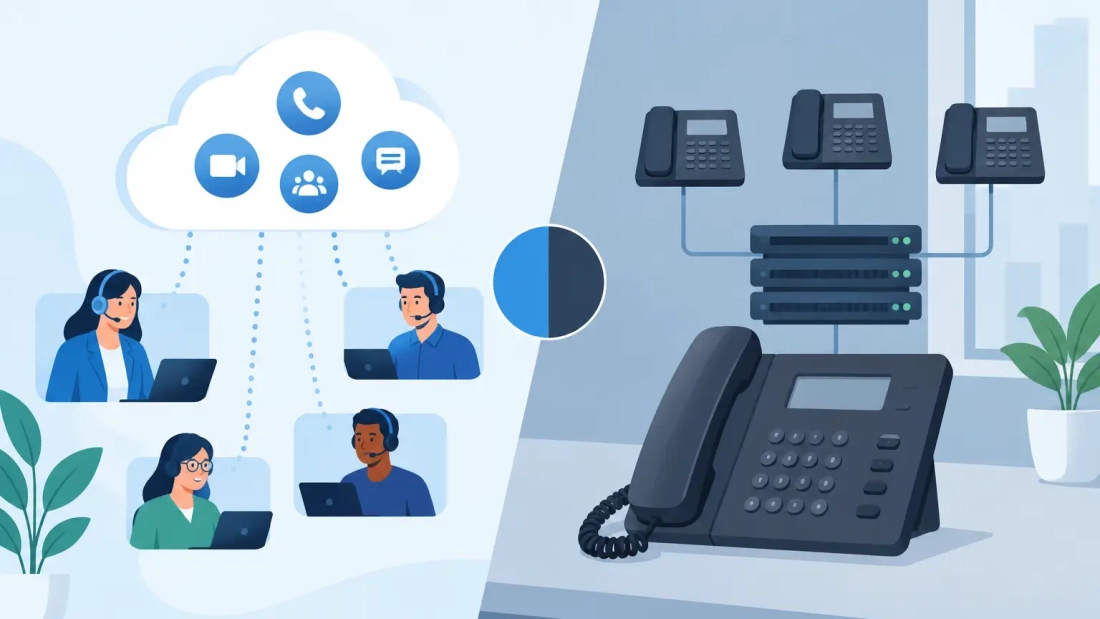
A missed customer call during a busy service window, a conference room that cannot join a video meeting, or a phone system that fails when staff work remotely can create an operational problem fast. The UCaaS versus PBX decision is not simply about replacing desk phones. It determines how your business communicates, how easily teams adapt, and how much responsibility your organization carries for uptime.
For South Florida businesses, the right answer depends on more than feature lists. It depends on where employees work, how reliable your internet connection is, whether you have IT resources to manage equipment, and what a communications outage would cost your operation.
UCaaS versus PBX: The Core Difference
PBX stands for private branch exchange. It is the system that routes calls within a business and connects internal users to outside phone lines. A traditional PBX is installed at your location, usually in a telecom closet or server room. Your business owns or leases the equipment and is generally responsible for maintaining it, configuring it, and planning for upgrades.
UCaaS, or Unified Communications as a Service, moves communication functions to the cloud. Voice calling is part of the platform, but so are commonly used collaboration tools such as messaging, video meetings, mobile calling, presence indicators, voicemail-to-email, and file sharing integrations. Users connect through desk phones, computer applications, or mobile devices rather than relying on a single office-based phone system.
The comparison can become confusing because hosted PBX is also cloud-based. Hosted PBX primarily focuses on business calling and call management, while UCaaS is designed as a broader communications platform. A hosted PBX may be the better fit for an organization that needs dependable business calling without a large collaboration suite. UCaaS may make more sense when voice, chat, meetings, and mobile work need to operate from one environment.
Traditional PBX: Control With More Responsibility
An on-premise PBX can be a sensible choice for organizations with specialized phone requirements, established internal IT teams, or facilities where communications need to continue locally during an internet disruption. Some healthcare, hospitality, manufacturing, and enterprise environments use on-site systems because they require custom integrations, legacy equipment support, or highly specific call flows.
The trade-off is ownership responsibility. Hardware has a life cycle. Software requires updates. Capacity expansion may involve additional cards, licenses, handsets, or cabling. If a component fails, the business needs a support plan and access to qualified technicians. A power outage, equipment-room issue, or aging system can affect the entire office.
Traditional PBX costs can also be front-loaded. The initial investment may include servers, gateways, phones, installation, carrier services, and ongoing maintenance. That model can work when a business expects its environment to remain stable for years. It is less attractive for companies opening new sites, changing headcount frequently, or supporting hybrid teams.
Where UCaaS Changes Day-to-Day Operations
UCaaS shifts infrastructure management from the business location to the service provider’s cloud platform. Instead of maintaining a phone server at every office, administrators usually manage users, extensions, call routing, and permissions through an online portal. Adding an employee or changing a call queue can be faster than scheduling an on-site hardware change.
Mobility is often the practical advantage. A sales representative can make and receive calls using the business number from a mobile app. An office manager can route calls to an alternate location during a building issue. Employees working from home can remain part of the same call queue and extension plan as their in-office colleagues.
This flexibility supports business continuity, but it does not eliminate planning. Employees need clear procedures for using mobile and desktop applications, handling customer calls remotely, and reporting quality issues. The system should also be configured with sensible call routing rules so that critical calls have a path to the right people when the main office is unavailable.
UCaaS commonly uses a predictable monthly subscription model. This can reduce capital expense and make budgeting easier, especially for growing businesses. However, decision-makers should look beyond the per-user price. Ask which features are included, whether meeting and messaging tools are necessary for every employee, how support is handled, and whether costs change as usage or integrations expand.
Reliability Depends on the Network Behind the Phones
Cloud calling relies on internet connectivity. That is not a reason to avoid UCaaS. It is a reason to treat business internet as part of the voice solution rather than a separate utility bill.
Voice traffic is sensitive to latency, jitter, packet loss, and congestion. A connection that seems adequate for basic browsing may still produce choppy calls when employees are uploading large files, running cloud backups, or joining high-definition video meetings. Consumer-grade service can also leave a business with limited support options when an outage affects customers and revenue.
A well-designed UCaaS deployment starts with enough bandwidth and the right network configuration. Business fiber with symmetrical speeds can support consistent upload and download activity, which matters when teams are on video calls, using cloud applications, and moving data at the same time. Network prioritization can help protect voice traffic from less urgent activity. For sites with high availability requirements, a secondary connection or cellular failover can provide another path if the primary circuit goes down.
Power planning matters as well. Cloud voice may keep the communications platform available, but desk phones, routers, switches, and Wi-Fi equipment still need local power. A battery backup or generator strategy can determine whether employees can continue taking calls during a short outage.
How to Choose Between UCaaS and PBX
Start with the way your business actually works, not the system you used five years ago. A single-office law firm that mainly needs reliable calling, call forwarding, and professional auto-attendant options may find a hosted PBX to be straightforward and cost-effective. A multi-location company with mobile staff, frequent video meetings, and shared call queues may gain more value from UCaaS.
Traditional PBX may still be justified if your organization has a large installed system, specialized analog devices, custom integrations, and internal staff prepared to support it. Replacing a functioning PBX simply because cloud communications are popular is not always the best business case. The question is whether the system can continue to meet your operational needs without creating growing costs or risk.
UCaaS is usually strongest when flexibility is a priority. It can simplify moves, adds, and changes; make remote work more consistent; and give employees multiple ways to stay connected. But it needs a dependable network, sensible security controls, and an implementation plan that includes training and call-flow design.
Questions to Ask Before You Buy
Before selecting a platform, assess the number of users, locations, remote workers, shared lines, call queues, conference rooms, and specialized devices your business supports. Review your current call volume and identify the points where customers experience delays or calls are missed.
You should also ask how outages are handled. Who answers support requests? What are the provider’s response expectations? Can calls be rerouted quickly? Is there a plan for internet and power interruptions? For a business that relies on phones to schedule appointments, dispatch crews, close sales, or support clients, those answers matter as much as a feature demonstration.
Security deserves the same level of attention. Use strong administrator credentials, multi-factor authentication where available, role-based permissions, and clear procedures for removing former employees. Fraud prevention settings, international dialing controls, and call-monitoring policies should reflect how your organization operates.
A Practical Path Forward for South Florida Businesses
The best communications decision is often paired with a network review. Before moving from a legacy PBX or choosing a new UCaaS platform, evaluate internet capacity, Wi-Fi coverage, switching equipment, power backup, and redundancy requirements. A strong voice platform cannot compensate for an overloaded or unreliable connection.
For businesses across Miami-Dade, Broward, and Palm Beach County, local conditions can add urgency to continuity planning. Storms, construction incidents, building power issues, and provider outages can disrupt a normal workday with little warning. Cloud-based communications can help teams work from another location or device, while properly designed connectivity and backup options reduce the chance that one event stops customer communication altogether.
AWBC approaches voice and connectivity as one operational conversation: what your staff needs to do, what your customers expect, and what must stay available when conditions are less than ideal. The useful next step is not choosing the most feature-heavy system. It is identifying the communication model that keeps your business reachable, productive, and prepared for its next change.