A phone system decision can affect much more than the monthly telecom bill. It shapes how quickly employees answer customers, how easily teams work between offices, and what happens when a circuit, device, or location goes down. When comparing SIP trunking versus UCaaS, the central question is simple: do you want to retain and manage your existing phone system, or move calling and collaboration to a provider-managed cloud platform?
Both options use internet-based voice technology. Both can support high-quality business calling. The difference is where the equipment, responsibility, and flexibility sit. For South Florida businesses, the right choice often comes down to existing infrastructure, operational needs, available IT resources, and the quality of the internet connection supporting the service.
SIP Trunking Versus UCaaS: The Core Difference
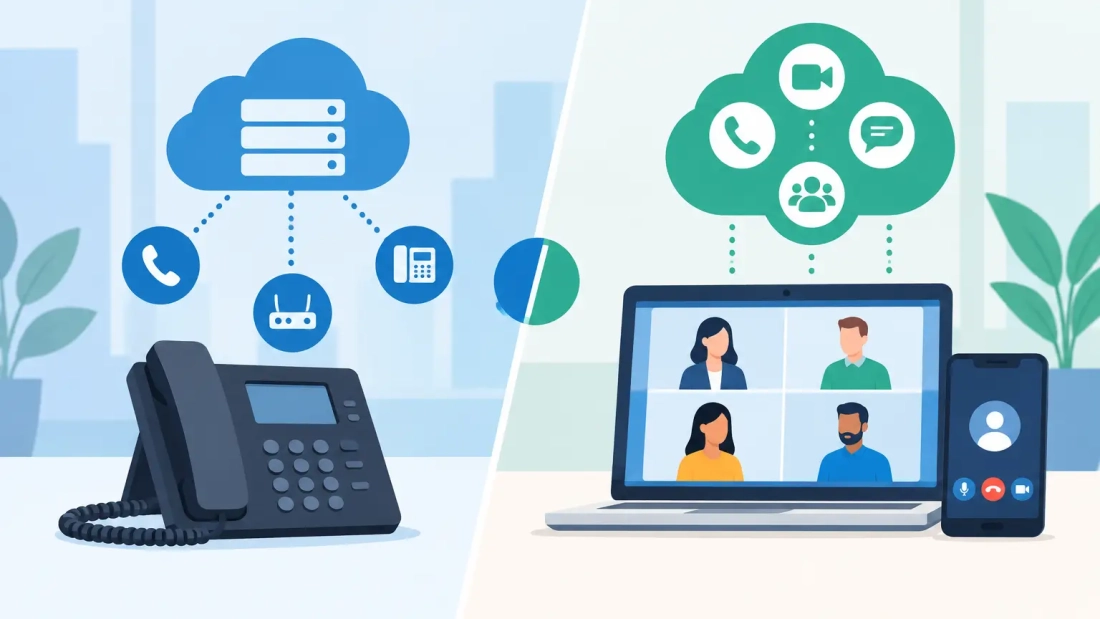
SIP trunking connects an existing private branch exchange, or PBX, to the public telephone network over an internet connection. Instead of purchasing traditional phone lines, a business buys virtual voice channels, called SIP trunks. The organization typically keeps its on-premises PBX or manages a virtual PBX environment itself.
UCaaS, or Unified Communications as a Service, is a cloud-based communications platform. It combines business phone service with features such as mobile and desktop apps, voicemail, messaging, video meetings, call queues, auto attendants, and presence indicators. The provider hosts and maintains the core phone system, while employees access it through desk phones, computers, and mobile devices.
SIP trunking is best understood as a way to modernize the connection behind a phone system. UCaaS is a broader service model that replaces or reduces the need to operate that phone system internally.
When SIP Trunking Makes Business Sense
SIP trunking can be a practical choice for companies that have already invested in a capable PBX, call center platform, or specialized communications setup. A large office with an established phone environment may not need to replace equipment just because traditional phone lines are being retired or becoming expensive to maintain.
It also gives businesses more control. Internal IT teams can select compatible hardware, customize dial plans, manage integrations, and configure the system around specialized workflows. A healthcare office, property management company, hospitality group, or enterprise with a complex call-routing structure may value that control.
Cost can be another advantage, particularly when a business has a stable existing system and high calling volumes. SIP trunks are generally more flexible than legacy PRI or analog lines. Capacity can be adjusted without adding physical circuits, and long-distance calling may be more economical depending on the service plan.
That control comes with responsibility. The business is still accountable for its PBX, software updates, licensing, security, backups, and often its own technical troubleshooting. If the PBX fails, the organization needs a recovery plan. If remote employees need modern collaboration tools, those may require separate platforms and integrations.
SIP trunking is not automatically the lower-cost option. It can be less expensive when the existing phone system has years of useful life and internal support is available. It can become more costly when aging equipment needs replacement, staff time is consumed by administration, or a business must add separate tools for chat, video, and mobility.
When UCaaS Is the Better Fit
UCaaS is designed for organizations that want business communications delivered as an ongoing managed service. Instead of maintaining a PBX in a server room or data center, the business uses a cloud platform that is updated and supported by the provider.
For a growing business, this reduces complexity. Adding a new employee may be as straightforward as assigning a user license, configuring a phone or app, and setting permissions. Opening a second office does not necessarily mean installing another phone system. Teams can use the same extension, directory, and call-handling rules whether they are at a Miami headquarters, a Broward branch, a home office, or on the road.
UCaaS also fits businesses that want calling to work across devices. A receptionist can answer from a desk phone, while a sales representative can use a mobile app that displays the business caller ID. Voicemail can be delivered through email or an app. Supervisors can adjust call queues without needing access to a physical PBX.
The trade-off is less direct control over the underlying platform. UCaaS systems are highly configurable, but they operate within the provider’s supported feature set. A business with unusual legacy integrations or highly customized call flows should confirm compatibility before moving.
Monthly per-user pricing is predictable, which helps many small and midsize organizations budget. However, decision-makers should look beyond the base license. Compare included calling, conference features, contact center needs, device costs, implementation, number porting, and any advanced reporting or compliance requirements.
The Internet Connection Is Part of the Phone System
Neither option performs well on an unreliable network. Voice calls are sensitive to latency, jitter, packet loss, and congestion. A connection that feels adequate for email may still produce choppy audio when multiple people are on calls, video meetings, cloud applications, and backups at the same time.
This is why business-grade internet should be evaluated alongside SIP trunking or UCaaS. Symmetrical fiber service can provide the upload capacity needed for cloud calling, video conferencing, file transfers, and off-site backups to run concurrently. Unlimited data, service-level commitments, and responsive support also matter when communications are tied directly to customer service and revenue.
Quality of service, often called QoS, should be part of the design. QoS prioritizes voice traffic so that a large download or backup job does not disrupt an important client call. Larger organizations may also benefit from separate network segments for voice, guest Wi-Fi, and core business systems.
Business continuity deserves equal attention. Ask how calls will be handled if the primary internet circuit is unavailable, a local power issue occurs, or the office cannot be accessed. Depending on the service, calls may be forwarded to mobile devices, a backup site, or a secondary connection. The best plan is one employees understand before an outage occurs.
Compare the Operational Requirements, Not Just Features
A feature checklist can make SIP trunking and UCaaS appear similar. Both may support auto attendants, extensions, voicemail, caller ID, and call forwarding. The more useful comparison is how each option affects daily operations.
Consider these questions before choosing:
- Does the business have a PBX that is reliable, supported, and worth keeping?
- Who will manage system changes, security updates, and troubleshooting?
- Do employees need to make and receive business calls from mobile devices and home offices?
- Are video meetings, messaging, and presence tools needed in the same platform?
- How quickly might the organization add staff, locations, or seasonal capacity?
- Does the current internet service have the performance and uptime needed for cloud voice?
For a company with a modern PBX, knowledgeable IT support, and specialized call routing, SIP trunking can preserve a proven investment while replacing outdated carrier lines. For a company that wants simpler administration, distributed-work flexibility, and integrated communications, UCaaS is often the more practical path.
Security, Compliance, and Emergency Calling
Cloud calling does not remove security responsibilities. Whether a business chooses SIP trunking or UCaaS, account access should be protected with strong passwords, multi-factor authentication where available, role-based permissions, and careful user offboarding. Fraud prevention settings and call monitoring policies should also be reviewed, especially for organizations with international calling or high-value customer interactions.
Emergency calling requires planning as well. Each phone system should have accurate emergency addresses for office locations, and remote workers should understand how their location information is managed. Businesses with multiple sites should verify their emergency calling configuration during deployment rather than assuming every extension is treated the same way.
Regulated organizations may need additional controls for call recording, retention, encryption, and access logs. These requirements do not automatically rule out either option, but they should influence provider selection and system design from the beginning.
Plan the Migration Before You Make the Change
A communications transition is easier when treated as an operational project, not a last-minute equipment swap. Start by documenting every phone number, extension, call queue, auto attendant option, fax line, alarm line, and third-party integration. Identify which numbers must remain active during the transition and who approves porting requests.
Then test the network under real conditions. A speed test is useful, but it is not a full voice-readiness assessment. The assessment should account for concurrent calls, video traffic, Wi-Fi coverage, firewall configuration, and failover options.
User adoption matters too. Employees need clear instructions for desk phones, mobile apps, voicemail, transfers, and emergency procedures. A well-configured platform still creates frustration if front-desk staff cannot quickly handle a customer call on the first day.
For South Florida businesses, the right communications model is the one that supports work without adding avoidable complexity. If you are keeping a proven PBX, build SIP trunking around dependable connectivity and a clear continuity plan. If your priority is flexible calling across offices and devices, choose UCaaS with the network capacity, support, and implementation planning to match.